SchedulePlus
|
Next Appointment allows the user to search for the next available appointment by selecting criteria such as provider, location, day of week, time of day and appointment type. The patient is then automatically scheduled when the preferred appointment slot is found. “Follow Up” appointments can easily be changed from follow up status and moved to an available appointment slot. Patients can be put on a waiting list for insertion into the appointment schedule as availability permits. SchedulePlus provides for appointment reminders and confirmations.
|
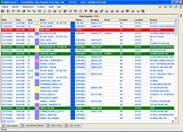
SchedulePlus is the most user friendly yet comprehensive appointment scheduling system available to medical practices. Appointments can easily be made or updated using any number of scheduling methods. Each scheduling method shows color coded time slots and appointment types as well as displaying the schedules, booked appointments and open time slots. Scheduling an appointment is as easy as selecting a desired time slot. Equally, rescheduling an appointment is easily accomplished by selecting the desired appointment and then choosing a new time slot. Canceling and updating patient appointments is quick and easy. SchedulePlus automatically verifies the patient's insurance, referring physician and authorization are valid, up to date and that the provider is contracted with the patient's insurance.
Screen Shots:
|
||
|
Calendars
SchedulePlus allows the user to set up unique calendars for each provider. A provider can be set up with their own time slot duration, number of bookings per time slot and maximum number of appointments per day. Multiple calendars can be set up for each provider. Individual calendars allow for date and day of week set up. Time slots can be set up with a schedule type and are color coded. Calendars are easily copied and modified for ease of use.
Appointment Scheduling
Appointment Scheduling allows viewing and scheduling of patients by providers for a selected location and date. Each “provider display” allows for individual provider review. Typically, most of the patient scheduling will take place here.
Daily, Weekly and Monthly
Daily, Weekly and Monthly scheduling methods provide for viewing and updating of patients by location and date. All methods are easily printed.
Physician Scheduling
The “Physician Scheduling” screen allows for viewing and scheduling of patients by location and the date for a selected physician. The user can then select dates and locations that are ideal for the provider. This method is extremely useful when setting up several visits for an individual patient.
Reports
There are many reports available in SchedulePlus categorized by appointment registers, chart pull lists, charge tickets, provider registers and face sheets. In addition, appointment summaries are available showing statistical information by provider and appointment type. |
|||

Copyright (c) 2006 Enterprise Healthcare Systems, Inc.